A strong cover letter can make a job application feel more personal, focused, and convincing. While a resume shows your skills, experience, and qualifications, a cover letter gives you the chance to explain why you are interested in the role, how your background fits the company’s needs, and what value you can bring if hired.
However, many job seekers struggle with writing cover letters. Some do not know how to start. Others repeat the same generic letter for every application. Some write too much, while others write too little. This is why using a cover letter generator and a professional cover letter template can make the process easier, faster, and more effective.
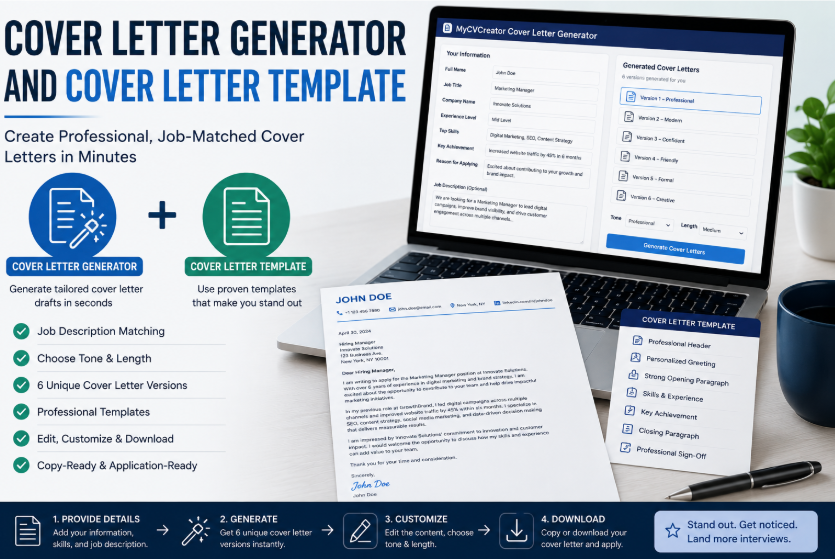
With MyCVCreator’s Cover Letter Generator, job seekers can create tailored cover letter drafts using their job title, company name, skills, achievements, experience level, and job description. Instead of starting from a blank page, users can generate a strong first draft and personalize it before applying.
What Is a Cover Letter Generator?
A cover letter generator is an online tool that helps job seekers create a professional cover letter faster. It uses the information provided by the user to produce a structured letter that can be edited and customized.
A good cover letter generator usually asks for details such as:
- Full name
- Target job title
- Company name
- Hiring manager name
- Experience level
- Industry
- Top skills
- Key achievement
- Reason for applying
- Job description
- Preferred tone
- Preferred length
The generator then uses these details to create a cover letter draft that sounds more relevant to the job. This saves time and helps job seekers avoid the stress of writing from scratch.
See also: Top 3 Mumbai Travel Attractions Nobody Should Miss
What Is a Cover Letter Template?
A cover letter template is a ready-made structure that helps you organize your letter correctly. It gives you a professional format to follow, so your message is clear and easy to read.
A basic cover letter template usually includes:
- Your contact information
- Date
- Employer or hiring manager information
- Greeting
- Opening paragraph
- Main body paragraph
- Achievement or skills paragraph
- Closing paragraph
- Professional sign-off
Templates are helpful because they guide your writing. Instead of wondering what to include, you can follow a proven structure and focus on making your message strong.
Why Job Seekers Need Both a Generator and a Template
A cover letter template gives your letter structure. A cover letter generator helps you create the content. When both are used together, they make cover letter writing easier and more effective.
A template helps answer the question: “How should my cover letter be arranged?”
A generator helps answer the question: “What should I write?”
Together, they help job seekers create a letter that is organized, relevant, professional, and ready to personalize.
Why a Cover Letter Still Matters
Some job seekers think cover letters are no longer important. But a strong cover letter can still help you stand out, especially when it is tailored to the job.
A resume tells the employer what you have done. A cover letter explains why your experience matters for the specific role. It allows you to show interest, personality, motivation, and understanding of the company’s needs.
A good cover letter can help you:
- Explain why you want the job
- Connect your skills to the role
- Highlight one or two strong achievements
- Show that you understand the company
- Add context that may not fit into your resume
- Make your application feel more thoughtful
- Encourage the recruiter to review your resume
A generic cover letter may not help much, but a tailored cover letter can strengthen your application.
The Problem With Generic Cover Letters
One of the biggest mistakes job seekers make is sending the same cover letter to every employer. A generic letter often sounds weak because it does not speak directly to the job description, company, or role.
For example, a generic cover letter may say:
“I am applying for this position because I believe I am a good fit. I have strong communication skills and experience in this field.”
This does not tell the employer much. It could be sent to any company for any role.
A stronger cover letter would say:
“I am excited to apply for the Customer Support Specialist role at GreenTech Solutions because your focus on customer satisfaction and digital support aligns with my experience resolving client issues, managing CRM records, and improving response times in fast-paced service environments.”
The second example is better because it is specific. It mentions the role, company, relevant skills, and value.
A cover letter generator helps job seekers create more specific and job-focused letters by using the details they provide.
How MyCVCreator’s Cover Letter Generator Helps
MyCVCreator’s Cover Letter Generator is designed to help job seekers create professional and job-matched cover letter drafts quickly. Users can enter their details, choose their preferred tone and length, and add the job description for better matching.
The tool can help users generate multiple versions of a cover letter, making it easier to compare different styles and choose the one that fits best.
It helps with:
- Tailored opening paragraphs
- Role-specific language
- Achievement-focused writing
- Job description matching
- ATS-friendly wording
- Professional tone selection
- Copy-ready drafts
- Faster cover letter creation
This makes it useful for job seekers who want to save time while still creating a strong and personalized application letter.
Why Adding the Job Description Improves the Cover Letter
One of the best ways to create a better cover letter is to use the job description. The job description contains important information about what the employer wants.
It may include:
- Required skills
- Job responsibilities
- Preferred experience
- Tools or software
- Company values
- Qualifications
- Industry keywords
When you include the job description in a cover letter generator, the tool can create a more relevant draft. This helps your letter speak directly to the employer’s needs.
For example, if a job description mentions project coordination, reporting, stakeholder communication, and deadline management, your cover letter should naturally reflect those areas if they match your experience.
This makes the letter more focused and persuasive.
What Makes a Good Cover Letter Template?
A strong cover letter template should be clean, simple, and professional. It should not be too complicated or too long. The goal is to help the reader quickly understand who you are, why you are applying, and why you are a strong fit.
A good cover letter template should include the following sections:
1. Professional Header
Your header should include your name, phone number, email address, and location. You may also include a LinkedIn profile or professional website if relevant.
2. Personalized Greeting
Where possible, address the hiring manager by name. If the name is not available, use a professional greeting such as “Dear Hiring Manager.”
3. Strong Opening Paragraph
Your opening should mention the role you are applying for and briefly explain why you are interested. This paragraph should immediately show relevance.
4. Skills and Experience Paragraph
This section should explain how your background matches the role. Mention key skills, responsibilities, or experience related to the job description.
5. Achievement Paragraph
A strong cover letter should include at least one achievement. This helps show real value instead of only listing responsibilities.
6. Closing Paragraph
End by thanking the employer and expressing interest in the next step. Keep the closing confident and professional.
Sample Cover Letter Template
Here is a simple structure job seekers can follow:
[Your Name]
[Phone Number]
[Email Address]
[Location]
[Date]
Dear [Hiring Manager Name],
I am writing to apply for the [Job Title] position at [Company Name]. I am excited about this opportunity because [brief reason you are interested in the role or company]. With experience in [relevant skill or field], I believe I can contribute positively to your team.
In my previous role as [Previous Job Title], I developed strong skills in [skill 1], [skill 2], and [skill 3]. I have experience in [relevant responsibility], which matches the requirements of this position. My background has prepared me to handle [specific job-related task] and deliver meaningful results.
One of my key achievements was [describe achievement]. This helped [explain result or impact]. I am confident that this experience will allow me to bring value to [Company Name].
Thank you for considering my application. I would welcome the opportunity to discuss how my skills and experience can support your team. I look forward to hearing from you.
Sincerely,
[Your Name]
How to Use a Cover Letter Generator and Template Together
Using both tools is simple. Here is a step-by-step process:
Step 1: Choose the Right Cover Letter Template
Start with a clean and professional template. Avoid overly designed layouts. A simple structure is usually better for readability.
Step 2: Collect the Job Details
Before generating your letter, collect the job title, company name, hiring manager name if available, and the full job description.
Step 3: Add Your Skills and Achievements
Write down your strongest skills and one major achievement related to the role. This helps the generator create a better letter.
Step 4: Generate the Cover Letter
Use MyCVCreator’s Cover Letter Generator to create multiple drafts. Choose the version that best matches your voice and the job.
Step 5: Personalize the Draft
Do not send the generated letter without reviewing it. Add personal details, adjust the tone, and make sure it accurately reflects your background.
Step 6: Match It With Your Resume
Your cover letter and resume should support each other. If your cover letter mentions leadership, project management, customer service, or technical skills, your resume should also show evidence of those strengths.
Step 7: Proofread Before Sending
Check grammar, spelling, company name, job title, and formatting. A small mistake can make the application look careless.
Best Tips for Writing a Strong Cover Letter
Here are practical tips to make your cover letter more effective:
Keep It Focused
A cover letter should not be too long. Most job seekers should aim for a clear, direct letter that fits on one page.
Avoid Repeating Your Resume Word for Word
Your cover letter should support your resume, not copy it. Use it to explain your motivation, strongest fit, and career value.
Use the Job Description
Match your letter to the employer’s needs. Mention relevant skills and responsibilities from the job description naturally.
Show Value
Do not only say you want the job. Show what you can bring to the company.
Use a Professional Tone
Choose a tone that fits the role. A corporate leadership role may require a more executive tone, while a customer service role may benefit from a warm and confident tone.
Include Achievements
Achievements make your letter stronger. Use results, numbers, improvements, or examples where possible.
Edit the Final Version
A generated draft is a starting point. Always personalize it before sending.
Who Should Use a Cover Letter Generator?
A cover letter generator is useful for many types of job seekers, including:
- Fresh graduates
- Entry-level applicants
- Career changers
- Mid-level professionals
- Senior professionals
- Remote job seekers
- Freelancers
- Internship applicants
- Job seekers applying to many roles
- Candidates who struggle with writing
It is especially helpful for people who know their skills but do not know how to present them clearly in a cover letter.
Cover Letter Generator vs. Writing From Scratch
Writing from scratch can be difficult and time-consuming. Many job seekers waste time thinking about the first sentence or how to organize their ideas.
A cover letter generator gives you a strong first draft quickly. You can then edit the draft to make it more personal and accurate.
The best approach is not to depend completely on automation. Instead, use the generator as a writing assistant. Let it help with structure and wording, then add your own voice, examples, and details.
Why MyCVCreator Is Helpful for Job Applications
MyCVCreator supports job seekers with tools that simplify the application process. In addition to resume-building support, users can create cover letters, improve career documents, and prepare stronger applications.
The Cover Letter Generator helps users save time, avoid generic writing, and create more tailored application letters. By using job title, company name, skills, achievements, experience level, tone, length, and job description, job seekers can generate stronger drafts that are easier to personalize.
This gives applicants a better starting point and helps them apply with more confidence.
Final Thoughts
A cover letter generator and a cover letter template work best when used together. The template gives your letter a professional structure, while the generator helps you create relevant and persuasive content faster.
In a competitive job market, sending a generic cover letter is not enough. Employers want to see that you understand the role and can bring value to their organization. A tailored cover letter can help your application stand out and encourage recruiters to look more closely at your resume.
Before applying for your next job, use MyCVCreator’s Cover Letter Generator to create a strong first draft. Then personalize it, match it with your resume, and submit a professional application that clearly communicates your value.
Author Bio
MyCVCreator is an online career platform that helps job seekers create professional resumes, cover letters, resume websites, and career documents. With tools such as a cover letter generator, resume builder, ATS resume checker, resume templates, and interview preparation resources, MyCVCreator helps candidates build stronger job applications and prepare for better career opportunities.
